If you are a higher-rate taxpayer or have untaxed income, you will probably have to file a Self-Assessment Tax Return.
But unsure how to pay self assessed tax return?
Table of Content
- What Is Self-Assessment Tax Return?
- Who Needs To Complete Self-Assessment Tax Return?
- Register For Self Assessment
- How To File Self Assessment Tax Return
- The SA100 Income Section
- Supplementary Tax Return Pages
- For Self Employed
- The UK Property
- The Capital Gains
- The Self Assessment Tax Bill
- Payment Of The Self Assessment tax
- What is the Self Assessment tax return deadline?
- Penalties for late filing
- Quick Tips For Self Assessment Tax Return
What Is Self-Assessment Tax Return?
The main purpose of Self Assessment is to declare all income for a tax year to HMRC to make sure that the right amount of income tax is paid.
In simple words, a Self Assessment is HMRC’s way to find out how much Income Tax and National Insurance an individual needs to pay on any income which is not taxed at source.
Generally, employees have their income tax automatically deducted from their employment income through the PAYE scheme.
This does not happen for self-employed, or for other types of income, like pensions or income from investments and savings, which is where the Self Assessment comes in.
Therefore, it’s very important to be aware of working out your tax liability so that money can be put aside to pay HMRC.
Visit our blog tips for starting year-end tax planning to simplify your tax planning.
Who Needs To Complete The Self Assessment Tax Return?
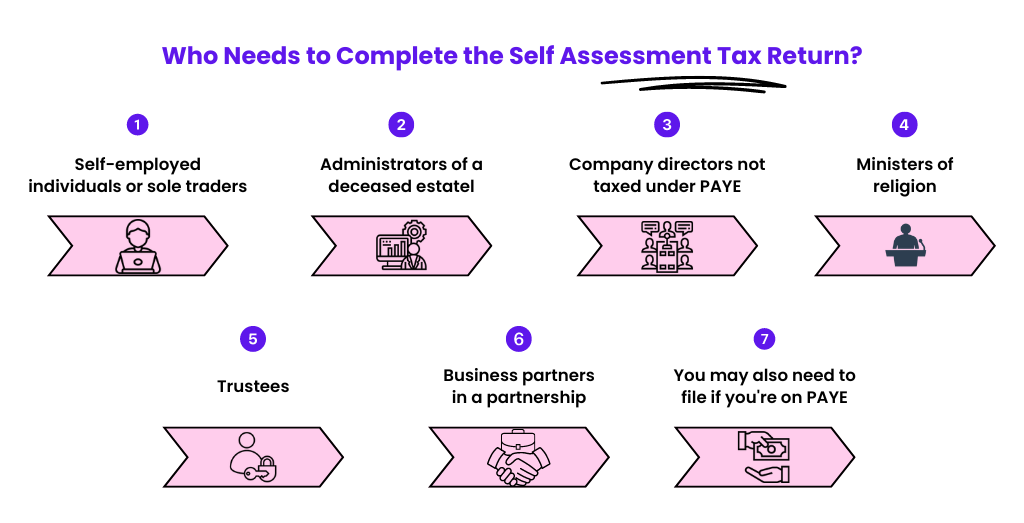
Individuals who are required to file a Self Assessment tax return include:
- Those who are self-employed or sole traders
- An administrator of a deceased’s estate
- You are a company director, and your income is not taxed under PAYE
- A minister of religion
- A trustee
- A partner in a business partnership
Also, even if you’re on PAYE, you may need to complete Self Assessment if:
- You’ve additional income from property, investments and other sources
- You have taxable foreign income
- You have an annual income of over £150,000 (£100,000 for tax year 2022/23 and before)
- You or your partner are receiving child benefits, and your income is over £50,000
- Your claims for expenses are over £2,500
- You have capital gains
There may also be other reasons as to why you need to send a Self Assessment tax return.
Registering For Self Assessment
Before completing the first tax return, you must register for the Self Assessment Tax Return.
Once you have registered, HMRC will set up the right records for you to ensure you pay the right amount of tax and National Insurance.
When an individual identifies the reason for filing the Self Assessment Tax Return, they must inform this to HMRC.
You can do this by completing either the online HMRC form or downloading and posting a completed SA1 form to HMRC.
After the registration for self-assessment, HMRC will send you a Unique Taxpayer Reference (UTR) number.
With the use of UTR number, you can be able to set up your government gateway account.
Once your government gateway account is up and running, you can log in and submit your tax return.
How To File Self Assessment Tax Return?
Wait! Before you sit down to complete your tax return, make sure you have everything you need on hand. This will make the process more straightforward.
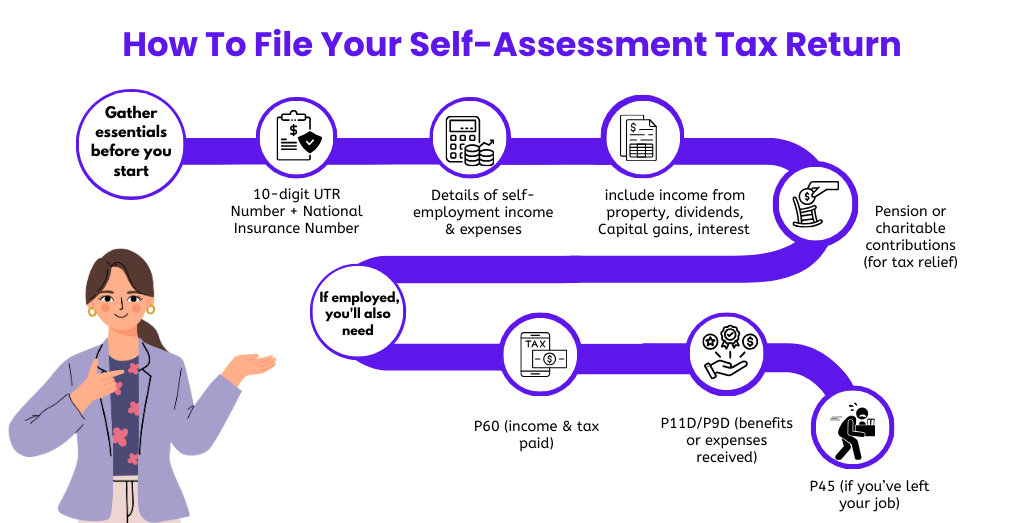
Let me tell you what you will need:
- Your 10-digit UTR number + National Insurance Number
- Details of any self-employment business expenses
- Details of income from self-employment, including bank statements, dividends and interests on shares
- Details of any pension or charitable contributions for tax relief
If you earn an income through employment, you will also need:
- P60 from your employer showing your income & the tax you have already paid
- P11D or P9D showing any benefits or expenses you received
- P45 if you’ve left your job during the tax year
As long as you’ve accurate records of your income and expenses, filling in the tax return will be no more headache than completing any regular expense form.
Now, all you have to do is enter all the information, and the system will take care of the rest.
The tax self-assessment tax return has a main section (SA100) and supplementary sections for income from other sources you have not paid tax on.
The SA100 Income Section
This section contains income from sources other than self-employment or employment and any pension or charitable contributions you have made.
This includes:
- Pension, annuities & state benefits
This covers details on the total and gross amounts of State Pension, the gross amount of other pension lump sums and details on benefits, such as Incapacity Benefit, Jobseeker’s Allowance, Industrial Death Benefit, Bereavement Allowance etc.
- Blind Person’s Allowance
You must note whether or not you are claiming this.
- Student Loan Repayments
You must note whether or not you are repaying a student loan and details of deductions made by the employer.
- A Marriage Allowance
In case your income for the tax year was less than a Personal Allowance, you can transfer the remaining allowance to your spouse.
- High-income Child Benefit
You must complete this section if you earn more than £50,000 and receive Child Benefit.
- Charitable donations
Details of all Gift Aid donations.
- Pension contributions
Details about all payments made into a registered pension scheme or annuity contract where contributions were made after tax.
Supplementary Tax Return Pages
If you are self-employed, have capital gains to declare, or earn income from property, you will need to complete the important supplementary pages below.
- Self-employed – SA103 form
- UK property – SA105 form
- Capital Gains – SA108 form
Each of these forms is divided into two sections: income and expenses.
For Self-Employed
Your income is everything you have earned through self-employment during the tax year, before expenses.
If you have other incomes, you must enter the one you earn the most from as the main income.
For instance, if you worked as a freelance web designer and earned £20,000 selling your services and £8,000 through your side hustle, you would have listed your web designer income as the primary income.
Your expenses are anything you have spent on your business in the last tax year.
The UK Property
Your income is the total amount you have earned from any furnished holiday lettings and from any other properties you put on rent.
Expenses can be the costs of maintaining and owning property unless you claim the trading allowance.
The Capital Gains
In the case of capital gains, your income is the total disposal proceeds for residential and non-residential property, shares, and securities.
Expenses can be claimed for the allowable costs of buying and improving assets.
Let’s understand the Self Assessment tax bill
After filing the self-assessment tax return, you will get a bill from HMRC in case you owe any tax.
Generally, it takes up to 72 hours after submitting your return for a final tax calculation to appear in your account.
The self-employed may need evidence of their earnings for various purposes, such as renting an apartment or applying for a mortgage.
If so, you can also request your SA302 tax calculation, which shows earnings over the past four years and an overview for the specific tax year.
Payment Of The Self Assessment Tax Return
In case you owe the tax, HMRC will tell you the exact amount you need to pay.
You can pay your tax bill by:
- Bank transfer – CHAPS or Faster Payments
- Paying-in slip from HMRC
- Debit cards
- Cheque
- Direct Debit
You cannot pay your tax bill using a credit card.
What is the Self Assessment tax return deadline?
The tax year in the UK runs from 6 April to 5 April the following year.
So, for instance, the 2023-24 tax year covered a period from 6 April 2023 to 5 April 2024 which means the postal deadline is 31 October 2024 and the online deadline is 31 January 2025. Late submission of the tax return will incur penalties.
It is crucial to remember that 31 January is not just the deadline for completing your return – it is generally the date you’ve to make your tax payment along with the first payment on account to the HMRC. The following payment is usually due on 31 July.
The deadlines for submission to HMRC:
- 31 October for the postal submissions
- 31 January for the online submissions
Penalties for late filing
HMRC allows nearly ten months from the tax year-end to file the Self Assessment Tax Returns—but do not leave it that late!
Because as soon as the return is one day late, HMRC will automatically issue the first penalty and will continue with additional penalties until you file the return.
| Tax Overdue by | Penalty | Notes |
| One day | £100 | This applies even if there’s no tax to pay or if a tax due has been paid, but a return hasn’t been filed. HMRC has waived the penalty provided you file our tax return by 28 February 2021. However, interest will be payable on any unpaid tax liability. |
| Three months | £10 for each following day | Up to the 90 day maximum of £900. This is in addition to the penalty mentioned above |
| Six months | £300 or 5% of tax due, whichever is higher | This is in addition to the penalties mentioned above |
| Twelve months | £300 or 5% of tax due, whichever is higher | In serious cases, they may apply a penalty of up to 100% of the tax due |
Quick Tips For Self Assessment Tax Return
- Get registered for Self The Assessment as soon as possible
Don’t leave it too close to the deadline. As HMRC says, it can take up to 10 working days to receive the UTR and up to 10 additional days to receive your activation code. So keep in mind to register at least one month before the deadline.
- Don’t rush
You don’t have to complete the Self Assessment return in one go. You can save your progress and can come back to it.
- Keep accurate records
Just don’t throw anything away, either. As a taxpayer, you have to keep records for at least a year after filing taxes. If you are self-employed, you must have records for six years.
- Check & check again
Before hitting submit on your tax return, go back through each section to ensure you’ve completed everything you need to.
- If you’ve made a mistake
You can make changes up to the Self Assessment deadline the following year.
- Download HMRC’s help sheets to assist you with each tax return section.
Making Tax Digital The Biggest Change to Self Assessment in 25 Years
If you earn over £50,000 a year from self-employment or rental income, the way you file your tax has just changed and a lot of people don’t know about it yet.
From 6 April 2026, HMRC rolled out something called Making Tax Digital for Income Tax (MTD). It doesn’t replace Self Assessment entirely, but it does change how often you need to report your income. Instead of one annual return, you’ll now need to send updates to HMRC four times a year every quarter as well as your usual year-end return.
According to HMRC, around 780,000 sole traders and landlords are affected in this first wave. If that includes you, here’s what you need to know.
Who does MTD affect right now?
MTD for Income Tax is being introduced in stages:
- From April 2026 – you must use MTD if your gross income from self-employment and/or rental property is more than £50,000 a year
- From April 2027 – the threshold drops to £30,000, pulling in another 970,000 people
- From April 2028 – it extends to those earning between £20,000 and £30,000
One important thing to note: it’s your gross income that counts that’s your income before you deduct any expenses. And it’s specifically income from self-employment and property. Wages from a PAYE job, dividends, and pension income don’t count toward the threshold.
Limited companies are not affected. MTD for Income Tax only applies to sole traders and individual landlords.
Payments on Account Why Your First Tax Bill Is Higher Than You Expect
This is the thing nobody warns you about when you first go self-employed. And every year, thousands of people get a nasty shock because of it.
Here’s the situation. You file your first Self Assessment return, work out what you owe, and feel ready to pay. Then you log into HMRC and see a number that’s much bigger than you budgeted for. Often, it’s around 50% higher. What’s going on?
The answer is something called Payments on Account.
What are Payments on Account?
Payments on Account are advance payments toward next year’s tax bill, based on what you owed this year.
HMRC’s logic is simple. Employees pay tax all year round through PAYE, a little bit each month. But if you’re self-employed, you don’t do that you pay it all in one go. So HMRC asks you to start pre-paying next year’s tax at the same time you settle this year’s bill.
It’s split into two instalments:
- First payment on account – due 31 January (same day as your main tax payment)
- Second payment on account – due 31 July
Each one is 50% of your previous year’s tax bill.
A real example to make it click
Let’s say your tax bill for 2024/25 is £4,000.
When you log in to pay that £4,000 by 31 January 2026, HMRC also expects your first payment on account for 2025/26 which is 50% of £4,000 = £2,000.
So the total you owe on 31 January is:
- £4,000 (your actual 2024/25 tax)
- £2,000 (first payment on account for 2025/26)
- Total: £6,000
Then on 31 July 2026, you pay the second payment on account another £2,000.
If your tax bill for 2025/26 turns out to be exactly £4,000 again, you’ve already paid £4,000 through your two payments on account, and nothing further is due in January 2027 (other than starting the cycle again).
If your bill is higher than £4,000, you pay the difference as a “balancing payment”. If it’s lower, HMRC refunds you the overpayment.
When does this apply to you?
You only need to make Payments on Account if:
- Your Self Assessment tax bill is more than £1,000, and
- Less than 80% of your tax was deducted at source (e.g. through PAYE)
So if your tax bill is under £1,000, you pay it in one go and Payments on Account don’t kick in.
What Expenses Can You Claim on Your Self Assessment?
One of the most effective ways to reduce your tax bill is to make sure you’re claiming every expense you’re entitled to. A lot of self-employed people either claim too little leaving money on the table or claim things they shouldn’t and end up with questions from HMRC.
Here’s a clear, practical breakdown of what you can and can’t claim.
The golden rule: it must be “wholly and exclusively” for your business
HMRC only allows expenses that were incurred “wholly and exclusively” for the purpose of your trade. In plain English: if the cost is purely for business, you can claim it. If it’s a mix of personal and business, you can usually claim the business portion only.
What you can claim
Office and admin costs
- Stationery, postage, and printer ink
- Accountancy and bookkeeping fees
- Bank charges on your business account
- Software subscriptions used for work (e.g. accounting software, design tools)
- A portion of your phone bill if you use it for business
Travel and transport
- Fuel, parking, and train fares for business journeys (not your regular commute)
- If you use your own car, you can claim a flat rate of 45p per mile for the first 10,000 miles, then 25p per mile after that this is called the HMRC mileage allowance
Working from home
- If you work from home, you can claim a flat rate of £6 per week without keeping any receipts
- Alternatively, you can calculate the actual proportion of your home costs (heating, internet, etc.) that relate to work though this is more complex and could affect Capital Gains Tax if you later sell your home
Equipment and tools
- Laptops, cameras, tools, or any equipment you buy and use for your business
- These are usually claimed through something called the Annual Investment Allowance, which lets you deduct the full cost in the year you buy it
Stock and materials
- Anything you buy to resell or use directly in making your product
Marketing and advertising
- Website costs, social media ads, business cards, promotional materials
Training and professional development
- Courses or training that improve your skills in your current trade not a completely new career
Clothing
- Protective or specialist clothing required for your job (e.g. a chef’s whites, a safety helmet)
- Ordinary business clothing is not allowable, even if you only wear it for work
Professional subscriptions
- Membership fees for industry bodies or professional associations relevant to your work
What you cannot claim
- Business entertaining (taking clients out for meals or drinks HMRC specifically excludes this)
- Your own food and drink (unless you’re travelling and away from your usual place of work)
- Clothing you could wear outside of work
- Speeding fines or other penalties
- Anything that’s personal rather than business
